# Live edit: How to add google maps

Reference to [How to edit your website](https://help.microweber.com/user-guide/live-edit-how-to-edit-you-site)

•  A new window will open showing the layout of your newly made website, search for a layout or block and click on “**Insert module**” by clicking on “**+**”.

<figure><img src="https://1981302401-files.gitbook.io/~/files/v0/b/gitbook-x-prod.appspot.com/o/spaces%2Fyz8FiPTUs5koUyant2Jj%2Fuploads%2F4CuxGrtk4NwSCEaIyOky%2Fimage.png?alt=media&#x26;token=acb90604-ab30-4161-ae4d-65304ab72d83" alt=""><figcaption></figcaption></figure>

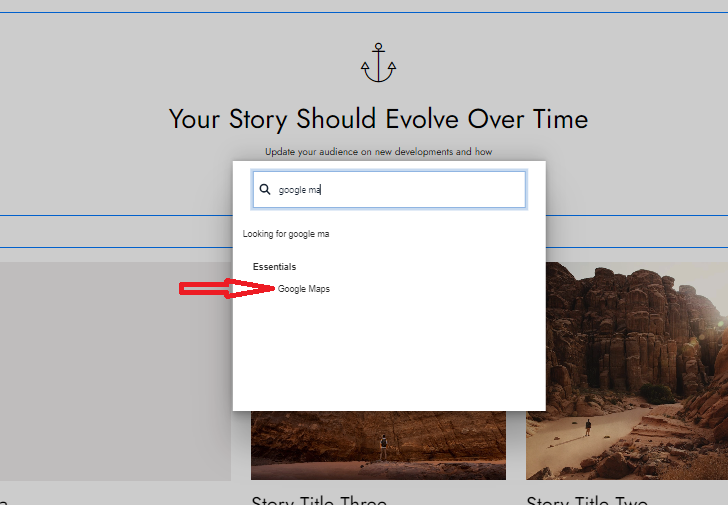
•  Type "G**oogle Maps**" on search bar then click on its icon to add.

<figure><img src="https://1981302401-files.gitbook.io/~/files/v0/b/gitbook-x-prod.appspot.com/o/spaces%2Fyz8FiPTUs5koUyant2Jj%2Fuploads%2FIJIkDr7DYVmfYLcL85Rq%2Fgoogle%20maps%20module.png?alt=media&#x26;token=df29493e-2f15-4952-aae2-ac15bb54e4cb" alt=""><figcaption></figcaption></figure>